Email security has become more important than ever as spoofing, phishing, and domain impersonation continue to threaten organizations. A properly configured DMARC record helps domain owners authenticate legitimate messages, identify unauthorized senders, and instruct receiving mail servers on how to handle emails that fail authentication. But how can you quickly determine whether your domain’s DMARC setup is working correctly?
A DMARC domain lookup provides a fast way to check your DNS configuration, review important DMARC tags, and identify potential authentication or reporting issues. In this guide, we’ll explain how to check DMARC records in seconds, which settings to review, common configuration problems to watch for, and best practices for maintaining a secure and reliable email authentication setup.
What a DMARC Record Is and Why It Matters for Email Security
A DMARC record (Domain-based Message Authentication, Reporting, and Conformance) is a critical component of modern email security. Positioned as a TXT record within the DNS (Domain Name System) of a domain name, a DMARC record acts as a set of instructions for email receivers on how to handle messages that fail authentication checks, outlining policy enforcement and reporting preferences. Organizations publish DMARC records to safeguard their domains against spoofing, phishing, and unauthorized use.
DMARC works alongside SPF (Sender Policy Framework) and DKIM (DomainKeys Identified Mail), which are underlying email authentication mechanisms. SPF verifies whether an email originates from an authorized server, while DKIM ensures email integrity via cryptographic signatures (the DKIM signature). DMARC adds another layer by aligning these mechanisms and specifying precisely what should happen if conformance fails — for example, whether to reject, quarantine, or allow (none) messages that do not meet alignment requirements.
This policy framework is instrumental in preventing attackers from impersonating legitimate domains, thereby protecting the organization’s reputation and increasing email deliverability rates. Mailbox providers like Yahoo Mail and Google Workspace often require DMARC conformance for optimal performance, ensuring only authenticated emails reach the inbox.
How a Domain Lookup Helps You Check DMARC Records Quickly
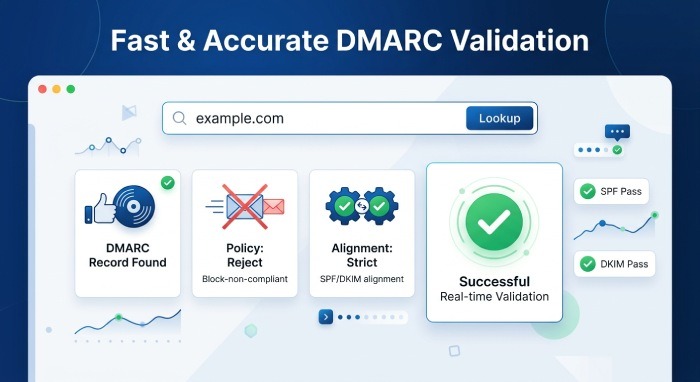
Performing a DMARC check through a rapid domain lookup is the fastest way to validate your domain’s current DMARC record and configuration. A DMARC checker, such as those provided by platforms like mxtoolbox, dmarcian, or EasyDMARC, allows administrators and MSPs to input their domain name and instantly retrieve the associated DMARC TXT record from DNS.
These online DMARC lookup tools act as diagnostic tools that parse and analyze the DMARC record. By entering your domain name, the DMARC record checker provides a detailed configuration analysis—including the policy in effect, alignment modes, reporting addresses, and more. This process automates what would otherwise be a time-consuming manual DNS query, ensuring real-time DMARC validation and reducing the risk of syntax errors or misconfigurations that could compromise email security.
Automated DMARC checkers also highlight if a domain name contains a DMARC record at all, and whether sub-domain policies are inherited or uniquely defined. For large organizations or those managing many sub-domains, this kind of domain lookup is indispensable for maintaining a consistent and effective email authentication setup.
Key DMARC Tags to Review: Policy, Alignment, Reports, and Enforcement
Table of Contents
Policy Tag (p): Controlling Message Handling
The p tag in a DMARC record specifies the enforcement policy for messages failing authentication checks. Its possible values are:
- p=none — Do not take action, just collect reports (monitoring mode).
- p=quarantine — Mark failing messages as spam or place them in a quarantine folder.
- p=reject — Reject messages outright if they do not pass email authentication and alignment checks.
For organizations starting out, a p=none policy allows safe monitoring without impacting email deliverability. Moving progressively to p=quarantine or p=reject is recommended for proactive protection against phishing and spoofing.
Alignment Modes: adkim & aspf
Alignment modes, defined by adkim (DKIM alignment) and aspf (SPF alignment) tags, determine the strictness of authentication:
- adkim and aspf can be set to r (relaxed) or s (strict).
- In relaxed mode, subdomains can be used for authentication; in strict mode, the domains must match exactly.
Proper alignment ensures that only legitimate senders using the organization’s domain or approved subdomains can pass DMARC validation checks.
Reporting Tags: rua, ruf, rf, ri, *afrf*, *iodef*
Reporting is at the core of DMARC’s value proposition. The following tags control email reporting and diagnostics:
- rua: URI(s) for aggregate report recipients. These XML-based aggregate reports provide an overview of authentication results across all email traffic.
- ruf: URI(s) for forensic report recipients. Forensic reports are detailed advisories about individual failures, using formats like afrf or iodef.
- ri: Reporting interval for aggregate reports (in seconds; default is 86400).
- rf: Format of forensic reports (e.g., afrf).
- iode*: URI for incident reports using the Incident Object Description Exchange Format.
Properly configuring reporting ensures the domain owner gains visibility into email program performance and abuse attempts.
Subdomain Policy: sp
The sp (subdomain policy) tag instructs receivers how to handle mail from sub-domains, providing granular control in multi-domain organizations.
Percentage Tag: pct
The pct tag enables gradual policy rollout by applying the DMARC policy to only a percentage of non-conforming messages. This is useful for staged implementation and reducing risk during policy transitions.
Common DMARC Record Issues and How to Fix Them
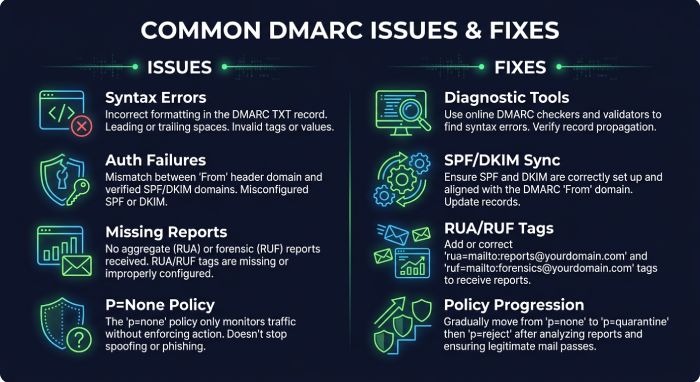
Syntax Errors and Misconfiguration
One of the most common issues discovered via a DMARC checker is syntax errors or misconfiguration in the TXT record. Incorrect tag values, missing tags, or malformed entries can result in DMARC records being ignored or misinterpreted by receivers. Always validate changes with a DMARC record checker or diagnostic tool from reputable providers like mxtoolbox or EasyDMARC before deploying.
Authentication Failures
Failures in SPF alignment or DKIM signature validation will cause legitimate emails to fail DMARC checks. Ensure all sending sources are included in your SPF and have access to DKIM private keys for signing emails. Regular configuration analysis using DMARC lookup tools helps identify gaps.
Incomplete Reporting Setup
Failing to correctly configure rua and ruf tags means losing valuable reporting data. Aggregate and forensic reports are essential for identifying unauthorized use, so always double-check report addresses and their accessibility.
Poor Enforcement Policy Progression
Some organizations remain stuck at p=none. While this provides visibility, it does not improve email security posture. Use aggregate report visualization to build confidence, and when conformance levels are high, move to stronger enforcement (quarantine or reject).
Fixing Issues
- Use automated DMARC checkers after each change.
- Deploy changes incrementally using the pct tag.
- Review SPF and DKIM configurations regularly for accuracy.
Best Practices for Monitoring and Maintaining Your DMARC Setup
Continuous Monitoring and Reporting
Leverage aggregate reports (rua) and forensic reports (ruf) for daily insight into authentication results. Visualization dashboards, like those on the EasyDMARC platform, simplify the analysis of reporting data, enabling quick detection of phishing, spoofing, or unauthorized sender activity.
Regular DMARC Checks and Validation
Make DMARC checks a routine part of your email program’s security posture. Use a DMARC checker to conduct regular DMARC lookups, and ensure your domain name and all subdomains are covered by robust, validated DMARC records.
Update and Review Sender Policy
Keep SPF and DKIM records up to date, reflecting approved Email Service Providers (ESPs) and sources. SPF alignment and DKIM d= domain values must match the Header From domain for proper alignment mode conformance.
Gradual Policy Hardening
Start with p=none for passive monitoring. As validation and conformance improve, move incrementally to quarantine and ultimately to reject for maximum protection. Use the pct tag to phase in strict enforcement if needed.
Detailed Configuration Analysis
Regularly perform configuration analysis of your DMARC setup using diagnostic tools. Look for new sources of legitimate emails, unapproved senders, and test subdomain policy (sp tag) effectiveness for the entire organizational domain.
Stay Informed with Standards
Reference RFC 7489 frequently for official DMARC record syntax and best practices. Participate in communities or consult with providers like mxtoolbox, dmarcian, or EasyDMARC to stay current with evolving email security trends, reporting interval recommendations, and DNS protocol changes.
Maintaining a robust DMARC implementation is not a one-time task. It requires sustained monitoring, prompt validation after changes, and ongoing reporting review to maintain operational excellence and uphold email security standards.