Most startups don’t plan their IT. A founder creates a Google Workspace or Microsoft 365 account, everyone uses their own laptop, and passwords live in a shared spreadsheet.
That’s fine for a team of three. It becomes a problem at 15, and a real risk at 40, usually right when a big customer sends over a security questionnaire.
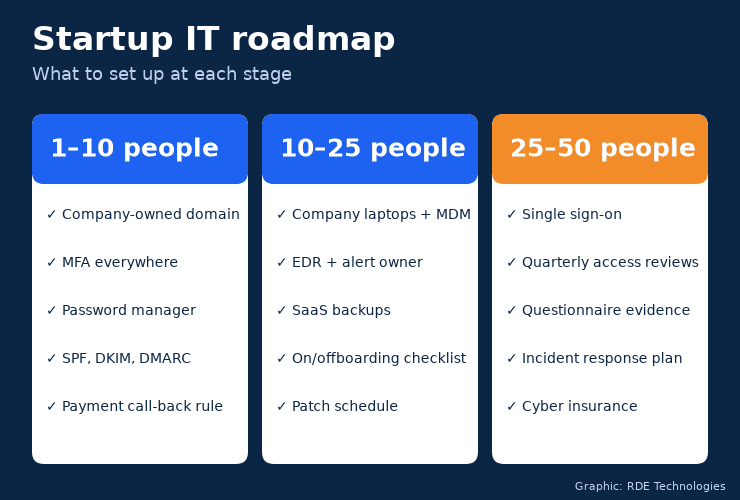
This guide breaks startup IT into three stages, so you do the right things at the right size without overbuilding.
Why does startup IT matter so early?
Because the cheap fixes are only cheap at the start. Moving 40 people onto managed laptops is a project. Starting five people that way is an afternoon.
Security is the other reason. Verizon’s 2026 Data Breach Investigations Report found that exploiting software vulnerabilities is now the most common way attackers get in, at 31% of breaches, and that phishing by text message and phone call succeeds 40% more often than email phishing (Verizon 2026 DBIR).
Small companies aren’t exempt. They’re simply less likely to notice.
Stage 1: 1 to 10 employees
At this size, the goal is to own your accounts and stop the most common attacks. Nearly everything here is free or close to it.
Table of Contents
Own your domain and admin accounts
Register the company domain in a company account, not a founder’s personal one. Make sure at least two trusted people can reach the domain registrar and the email admin console.
It sounds obvious. It’s also one of the most common messes we see when a co-founder leaves.
Turn on multi-factor authentication everywhere
Enforce MFA on email, cloud storage, the code repository, banking and payment tools. Microsoft’s researchers found MFA reduced account compromise risk by more than 99% in the accounts they studied (Microsoft Research).
Use an authenticator app or security key rather than text-message codes where you can.
Adopt a password manager
Kill the shared spreadsheet. A business password manager gives each person a vault, lets you share credentials securely and makes offboarding far easier.
Protect your email domain
Set up SPF, DKIM and DMARC records. They make it harder for someone to send email that looks like it came from your domain, which matters the first time a fake “CEO” asks finance to pay an invoice.
Write down a payment-verification rule
Any new payee or change to bank details is confirmed by a phone call to a number you already have. Business email compromise caused just over $3 billion in reported losses in 2025, according to the FBI’s Internet Crime Complaint Center. This rule costs nothing.
Stage 2: 10 to 25 employees
Now you’re hiring regularly, people are joining and leaving, and “just ask Sam” stops scaling. The goal is consistency.
Buy company laptops and manage them
Personal laptops are cheap until someone leaves with your customer data on one. Company-owned devices enrolled in a device management platform let you enforce encryption, screen locks and updates, and wipe a lost machine remotely.
Install endpoint detection and response
Basic antivirus isn’t enough. Endpoint detection and response (EDR) watches for suspicious behaviour, like a process encrypting files, and can isolate a device. Decide who actually watches the alerts.
Back up your SaaS data
Many founders assume Google or Microsoft backs up everything forever. Their responsibility is mostly keeping the service running; recovering something your team deleted, or ransomware encrypted, is largely on you.
A third-party backup for email, shared drives and key SaaS tools closes that gap.
Build onboarding and offboarding checklists
New hires should get the right accounts on day one. Leavers should lose access the same day.
A simple checklist covering email, password manager, code repository, payment tools and shared drives prevents the “ex-employee still in the Slack” problem.
Patch on a schedule
Turn on automatic updates for operating systems and browsers. For anything internet-facing, check CISA’s Known Exploited Vulnerabilities catalog and patch those issues first.
Stage 3: 25 to 50 employees
This is when enterprise customers, investors and insurers start asking questions. The goal is to prove what you’ve built.
Move to single sign-on
Single sign-on (SSO) puts every app behind one identity with MFA. It makes access easy for employees and offboarding a single click for you.
Review access quarterly
Every quarter, check who has admin rights and who can reach sensitive systems. People change roles. Access tends to only grow unless someone trims it.
Get ready for security questionnaires
Your first big customer will send a long spreadsheet asking about MFA, encryption, backups, incident response and vendor management. Some will ask for a SOC 2 report.
Keep a folder of current policies and evidence, such as MFA settings, device encryption status and backup test results. Answering becomes a few hours of work instead of a few weeks.
Write an incident response plan
One page is enough to start: who decides, who calls the lawyer and insurer, how you communicate if email is down and where backups live. Rehearse it once a year.
Consider cyber insurance
Insurers will ask about most of the controls above. If you’ve followed this roadmap, the application will be straightforward.
Hire, outsource or both?
At 50 people, a single IT hire can’t cover help desk, security, cloud administration and compliance alone. Many startups use a hybrid: an internal operations lead who owns the roadmap, plus an outside provider for day-to-day support and monitoring.
Founders in our area often bring in managed IT services in New York City at this stage rather than recruiting a full team. Wherever you are, ask any provider three questions: how they handle onboarding and offboarding, who responds to security alerts out of hours, and whether they can produce evidence for a customer questionnaire.
Mistakes that get expensive later
Letting founders own critical accounts personally
Domains, admin consoles and payment tools should belong to the company, with at least two admins.
Skipping MFA “for now”
It’s always harder to roll out to 40 people than to 5.
Treating IT as a one-time setup
Controls drift as people join, leave and install new tools. A quarterly review keeps the roadmap honest.
The bottom line
Good startup IT isn’t about spending a lot. It’s about doing the right few things at each stage, so that when you’re 50 people with a demanding customer, your answers are already written down.
About the author: Nathan Spitalny is the CEO of RDE Technologies, a managed IT and cybersecurity provider founded in 2009 in Oceanside, New York. His team supports healthcare practices, senior-living facilities and small businesses across New York City and Long Island.