
In today’s interconnected world, efficient email delivery and robust email security are essential for every organization. Correctly configuring the Sender Policy Framework (SPF) by generating a valid SPF record for your domain name ensures authentic email communications and prevents phishing or spoofing attacks. Leveraging a free SPF record generator can simplify the daunting process of managing DNS SPF records. This guide explores the importance of an SPF record, how SPF record generators work, step-by-step creation instructions, best practices, and routine maintenance for optimal email health.
What Is an SPF Record and Why It Matters for Email Deliverability
An SPF record (Sender Policy Framework record) is a type of DNS record that specifies which mail servers (identified by IP address) are authorized to send email on behalf of a specific domain name. By defining these parameters in SPF specifications, organizations improve email deliverability and strengthen recipient trust.
Table of Contents
How SPF Records Enhance Email Protection
SPF is an authentication mechanism that works alongside protocols like DMARC (Domain-based Message Authentication, Reporting, and Conformance) and DKIM (DomainKeys Identified Mail). When a mail server receives an email claiming to be from your domain, it performs an SPF record check (often using a lookup tool such as MxToolbox* *SPF Raw Checker or EasyDMARC* *SuperTool). The server queries the DNS for the SPF record and matches the sending server’s IP address against the list of authorized addresses.
- If a valid SPF record is found and the sending server is listed, the email passes SPF authentication.
- Failure to have a valid SPF record—or improperly configuring one—can result in legitimate emails being flagged as spam, undermining your email deliverability.
Impact on Email Reputation and Threat Intelligence
A well-crafted SPF record, combined with DMARC and DKIM, achieves continuous visibility over email flows, prevents phishing attacks, and provides sender insights through threat intelligence tools. Services like Reputation Monitoring and Lookalike Domain Checker can further enhance your domain’s defenses by alerting you to blacklisted IPs or suspicious activities.
How a Free SPF Record Generator Works
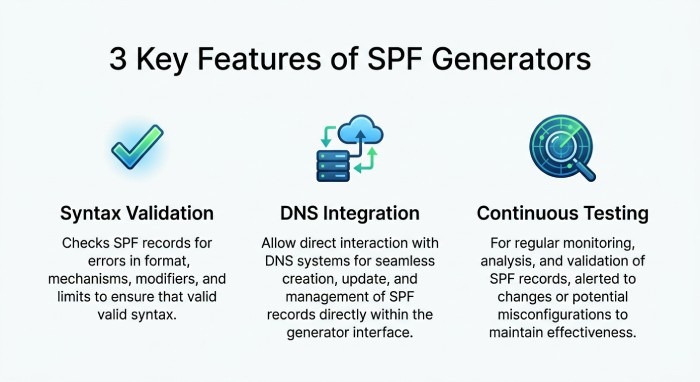
A free SPF record generator is a web-based tool designed to simplify the creation and management of SPF records, regardless of your technical expertise. Many reputable platforms—such as MxToolbox, EasyDMARC, and DMARCian—offer user-friendly SPF record creators that automate SPF record syntax and eliminate guesswork.
Key Functionalities of SPF Record Generators
Automated Syntax Validation
One of the principal values of an SPF record generator tool is its built-in syntax validation. These tools ensure compliance with the latest SPF specifications by confirming the record’s format is correct before publication.
Seamless Integration with DNS Manager
After creating a valid SPF record, most tools provide copy-ready TXT strings that can be seamlessly integrated into your domain’s DNS records via your DNS manager (e.g., GoDaddy, Cloudflare, AWS Route 53).
Continuous Testing and Visibility
Some platforms even integrate with services like Delivery Center or Alert Manager—offering continuous visibility into your authentication infrastructure, making it easy to modify current SPF record settings when necessary.
Step-by-Step Guide to Creating a DNS SPF Record Instantly
Generating a valid DNS SPF record is straightforward with the right tools. Below is a detailed process using a free SPF record generator:
Step 1: Collect Information About Your Email Infrastructure
Identify all mail servers and authorized senders for your SPF domain:
- Gather all public sending IP addresses (IPv4 and, if applicable, IPv6).
- List third-party services sending email on your behalf (marketing platforms, CRMs).
- Note associated MX records or A records representing outbound mail servers.
Step 2: Launch a Trusted SPF Record Generator
Select an SPF record creator such as:
- MxToolbox SPF Generator (also provides a robust SPF checker and SPF record lookup tool)
- EasyDMARC SPF Record Generator
- SuperTool (DMARCian SPF Tool)
Input your domain name and other sender details as prompted.
Step 3: Define Your SPF Record Parameters
With the generator:
- Add all authorized IP addresses in IPv4 and IPv6 formats.
- Use includes mechanisms to authorize third-party services.
- Reference any relevant A record or MX record tied to your domain.
- Set the failure policy at the end of the record using options such as:
- -all (fail): Strictest policy, only listed servers can send email.
- ~all (softfail): Non-authorized sources are marked but usually accepted.
- ?all (neutral): No explicit policy, not recommended for most use cases.
- +all (none): Allows all, undermines email security, never recommended.
- Leverage advanced mechanisms like redirect or exist if necessary.
Example SPF record syntax output by the generator:
v=spf1 ip4:203.0.113.1 ip6:2001:db8::1 include:mail.thirdparty.com mx a -all
Step 4: Generate and Save the SPF Record
When you click “generate record,” the tool will display your tailored SPF record as a TXT string, ready for DNS deployment.
Step 5: Publish Your SPF Record in DNS
Access your domain’s DNS manager:
- Locate the correct DNS zone for your domain name.
- Add a new TXT DNS record with @ or the root domain as the name.
- Paste your SPF record into the value field.
- Save and propagate the record across DNS servers (may take up to 48 hours).
SPF Record Best Practices and Common Mistakes to Avoid
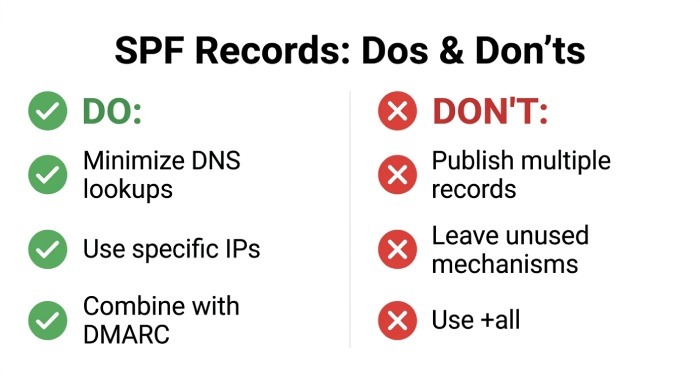
Adhering to best practices ensures ongoing email protection and maximizes email deliverability.
SPF Record Best Practices
1. Minimize DNS Lookups
SPF allows a maximum of 10 DNS-based mechanisms (e.g., include, a, mx, exists, redirect). Exceeding this can cause SPF authentication failures.
2. Use Specific IP Addresses
Always specify individual IPv4 and IPv6 addresses for your authorized mail servers; avoid using broad include statements unless truly necessary.
3. Regularly Review and Update Records
Whenever you add new sending services or switch providers, modify your current SPF record using a manual edit or regenerate using your preferred SPF record generator.
4. Combine with Other Email Authentication Protocols
Deploy DKIM, DMARC, and consider BIMI for further branding and security. Comprehensive checkups using a suite of tools—like Email Header Analyzer, Email Deliverability Test, or Domain Scanner—ensure maximum protection.
Common Mistakes to Avoid
- Publishing multiple SPF DNS records on a single domain name (always only one per domain).
- Leaving excessive or unused mechanisms that dilute security or introduce lookup errors.
- Using +all (none) at the end of your SPF record, effectively disabling SPF protection.
How to Publish, Test, and Maintain Your SPF Record
Correct publication and ongoing SPF record checks are critical to effective email security.
Publishing Your SPF Record
Follow the generator’s guidance for DNS record formatting. Use preview or DNS validation features in tools like MxToolbox, EasyDMARC, or SuperTool to confirm the record found matches your intended configuration.
Testing and Validating Your SPF Record
Utilize:
- SPF checker tools for syntax validation and authenticity checks.
- SPF record lookup and SPF raw checker solutions for active monitoring.
- Email health platforms (e.g., Email Health, Blacklists, Phishing Link Checker).
Ongoing Maintenance and Troubleshooting
- Schedule periodic SPF record checks to validate any new senders or IP addresses.
- Leverage alerting tools and API reference to receive notifications about SPF failures or email deliverability issues.
- Use the expertise and community insights on platforms like Expert Insights, G2 Crowd, and SourceForge for evolving best practices.
By incorporating a reliable SPF record generator, adhering to SPF specifications, and maintaining proactive oversight, organizations ensure their domain name enjoys optimal email delivery, robust authentication, and advanced email protection against phishing and spoofing threats.