Any missing WhatsApp Business message can create a lot of trouble for the business owners. When important customer questions, order details, or deal discussions disappear, they can lead to delayed replies or unhappy clients. Many users believe that those messages are gone forever, but that’s not true if the data is not overwritten.
The right recovery method depends on how the messages disappeared and whether a backup was available. Hence, this guide will explain how disappearing messages work on WhatsApp Business and how Dr.Fone Android data recovery software can help when a standard method cannot.
Part 1. How WhatsApp Disappearing Messages Actually Work
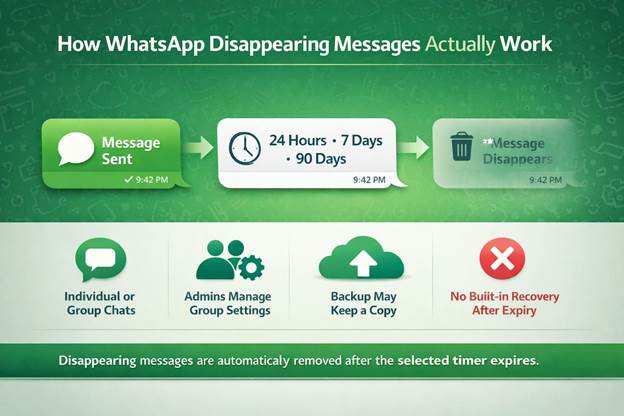
Before you choose the right recovery software Android app to get back messages, it’s important to learn the basics. WhatsApp says that disappearing messages operate on an automated countdown that ranges from 24 hours to 7 days to 90 days. After the selected duration, WhatsApp attempts to remove messages from chat history, though quoted, forwarded, backed up, or saved copies may remain.
In addition, WhatsApp Business allows you to enable this option either for certain chats or for all. As for group chats, admins can enable or disable this option. So, backups and auto-downloaded media made before the message expires may still contain a copy. However, once the message expires without a usable backup or saved copy, WhatsApp provides no built-in option to recover that chat.
Part 2. Is a Deleted Business Message Gone for Good?
It is possible to recover Disappearing Messages on WhatsApp Business, but it depends on the last backup created. When the message vanishes from the chat, the data may remain in your phone’s storage until new data replaces it.
Hence, if the Google Drive or iCloud backup was made before the expiration, the backup may contain the chat, says WhatsApp. If there is no backup, the only option left is to use recovery software to scan the phone’s internal storage.
Part 3. Weighing Your Recovery Options: What Backups Do and Don’t Preserve
If you want to know about the official and third-party recovery options, this section is for you. Go through the detailed table and learn what option is suitable to recover WhatsApp Business disappearing messages:
| Recovery Methods | What It Preserves | Key Limitation | Best For |
| Google Drive Backup (Android) | Full chat and media history if the backup was created before the messages disappeared. | Restoring replaces the current WhatsApp data with the backup version, so newer chats are lost. | Users with recent, scheduled backups. |
| iCloud Backup (iPhone) | Full chat history and media from the backup snapshot. | Only restores during setup; it cannot selectively recover a single chat. | Full device restores, not single chat recovery. |
| Local Device Backup | WhatsApp local backups are stored on Android devices. | Limited to the most recent available backup and can be overwritten by newer backups. | Quick recovery without cloud access. |
| “Keep” (Native WhatsApp) | Messages are manually saved before they expire. | Requires action before the message disappears; it cannot recover expired messages. | Prevention, not recovery. |
| Manual Screenshot/Export | Messages or media saved before expiration. | Only preserves content that was manually saved in advance. | Partial or incomplete records. |
| Standard Recovery Apps | Recovery capabilities vary by tool and supported data sources. | Recovery success depends on available device data and supported recovery methods. | Simple, recent data recovery scenarios. |
| Dr.Fone – Android Recovery Software | Scans supported device data and available backups to recover recoverable WhatsApp messages, media, and attachments. | Some recovery or export features require a paid license. | Business-critical conversations and comprehensive recovery needs. |
Part 4. Restoring Messages with Dr.Fone – Android WhatsApp Recovery
Of all the options, Dr.Fone Android data recovery software is the preferred choice because backups are an all-or-nothing approach. Since they also cannot recover selected chats, Dr.Fone features selective and bulk WhatsApp Business chat restoration options. It can also be used to recover WhatsApp data from iCloud, iTunes, Google Drive, and other supported backup sources.
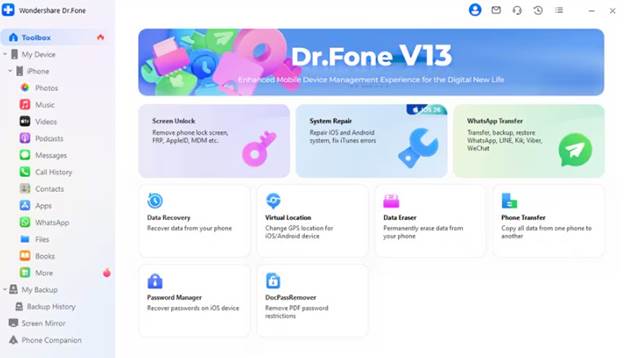
Since these aspects make Dr.Fone versatile, the guides are separate and detailed, with the option to get a 100% thumbnail preview of recovered chats. In addition to disappearing messages, it can also retrieve View Once media from Android devices and iPhones if the data fragments are not overwritten. All this is done via the free, read-only scan that keeps the existing data safe from being overwritten.
Simple Guide to WhatsApp Business Disappearing Data from Android Devices
If the data is not overwritten yet, follow the given guide and learn how to recover Disappearing Messages on WhatsApp Business via Dr.Fone:
Step 1. Access the Recover WhatsApp Business Data Mode
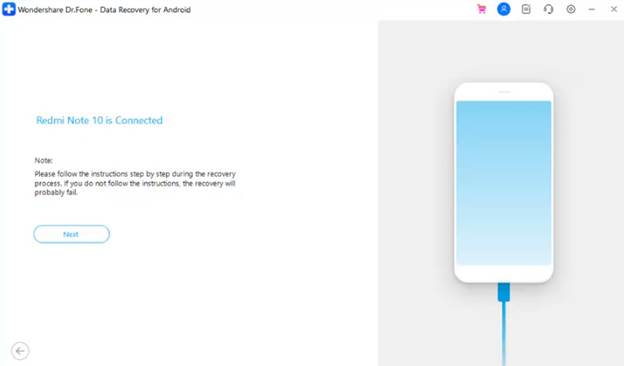
Pick the “Recover WhatsApp Business Data” feature on the Data Recovery tool for Android, connect the device to the computer, and click “Next.”
Step 2. Backup and Restore WhatsApp Business Data
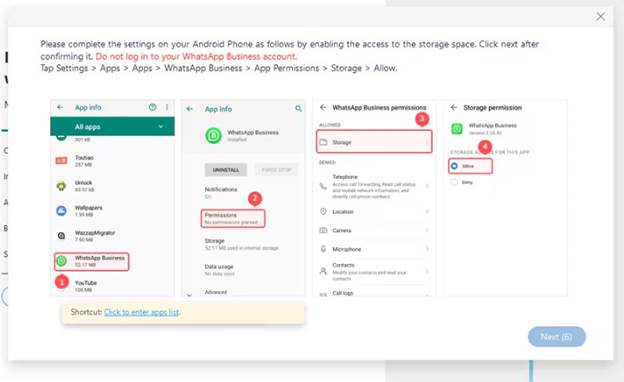
Follow the on-screen instructions to create a local WhatsApp Business backup and monitor the progress. Enable the storage options in the new instructions interface, then tap “Next” to continue.
Step 3. Choose to Export and Recover WhatsApp Business Data
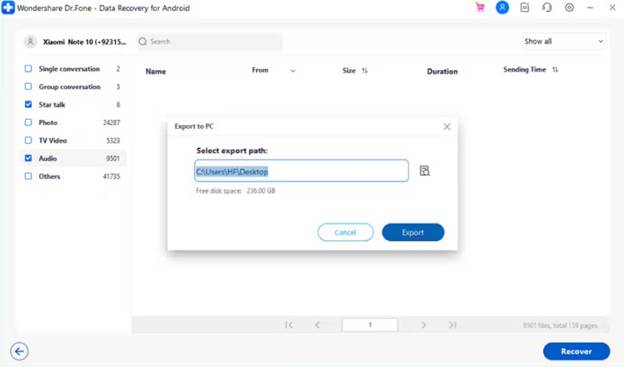
Activate WhatsApp Business as you add the details and follow the on-screen instructions until Dr.Fone displays all the recovered WhatsApp Business data. Pick the messages you want to get back and click on the “Recover” option to pick the location and press “Export.”
Part 5. Keeping Your Business Conversations Safe Going Forward
Now, you know why Dr.Fone – Data Recovery (Android) is the practical choice over any basic recovery software Android app, or backup option. Follow these tested tips and learn how you can keep the important WhatsApp Business data secure in the future:
| Strategy | What It Does |
| Enable Regular Backups | Creates frequent backup copies so chats remain recoverable before disappearing messages expire. |
| Use “Keep” in Chat for Critical Messages | Saves eligible disappearing messages before they expire when supported by WhatsApp. |
| Avoid Disappearing Mode for Business Records | Reduces the risk of losing important customer conversations, orders, or compliance-related messages. |
| Export Important Chats Manually | Creates a separate copy of important conversations outside WhatsApp for future reference. |
| Keep a Trusted Recovery Tool Ready | Provides an additional recovery option when backups are unavailable or insufficient. |
Conclusion
Lost business chats can disrupt operations, but the disappeared messages don’t have to be permanently gone. Since the backup options provide a basic safety net, they lack the flexibility to restore specific chats and overwrite recent data. For the selective restoration, where new data remains safe, it is recommended to use Dr.Fone – Android data recovery software.