💡 Quick Summary & Troubleshooting Guide: Hulu streaming errors typically stem from network timeouts, corrupted app cache, outdated device firmware, or HDMI handshake failures. Use the quick index below to jump straight to the exact working solutions for your specific Hulu error code.
Hulu Error Code Quick Navigation Index
| Error Code | Primary Cause | Quick Fix | Direct Guide |
|---|---|---|---|
| P-DEV320 | Communication / App player glitch | Clear cache & update app | Jump to P-DEV320 Fix → |
| P-DEV318 | HDMI / Digital rights handshake | Restart device & switch browser | Jump to P-DEV318 Fix → |
| P-TS207 | Network playback timeout / VPN block | Disable VPN & power cycle router | Jump to P-TS207 Fix → |
| RUNUNK13 | Web player buffering / browser conflict | Clear cookies & try Incognito | Jump to RUNUNK13 Fix → |
| Error 94 | Outdated device firmware / compatibility | Deactivate & reactivate device | Jump to Error 94 Fix → |
Part: How to Fix Hulu Error Code P-DEV320
Have you ever used Hulu? Indeed, it is one of the best American subscription services offering video-on-demand. With the high-quality service at the most affordable price, Hulu is a pioneer when it comes to variety and live stream of videos.
But at the same time, you have faced various errors while streaming. One such standard error is Hulu error code p-dev320. The error p-dev 320 can occur anytime, whether you are using Hulu on tv, Vizio, or Roku.
So, today let me share some solutions tested by various users to solve the p-dev320 Hulu error. But before we get to the solutions, let me briefly talk about what does Hulu error code p-dev320 means?
Hulu Error Code P-dev320
We all have used the online video-on-demand streaming platforms and have faced various errors as well. While some were easy to understand, some were quite difficult to tackle. Hulu also displays the errors occasionally, and one such error is the p-dev320 error code.
When you encounter such an error, the message that will be displayed will look like: “We’re having trouble playing this. It may help if you turn your device off for a minute and try again. Hulu Error Code: P-DEV320 “. It is nothing but a communication error between the Hulu app, Web Player, and Hulu server, which you can quickly solve with some small tips and steps.
Causes Of Hulu Error Code p-dev320
In my experience, the major causes of the Hulu p-dev320 are:
- Internet connection issue
- Temporary files interfering with the connection
- Outdated version of Hulu
- Using Hulu on an unsupported device
- The problem is from the Hulu server end.
Now, I am sure you now know, “What is Hulu error code p-dev320?”. So let us move to the solutions that can help you solve Hulu error code p-dev320.
Resolving Hulu Error Code P-dev320
If you are also the one saying, “Hulu, we’re having trouble playing this p-dev320”, then the following solutions might help you. These are the ones suggested by various community members making them more reliable. So, let me start sharing them with you all:
Solution 1: Check Internet Connection
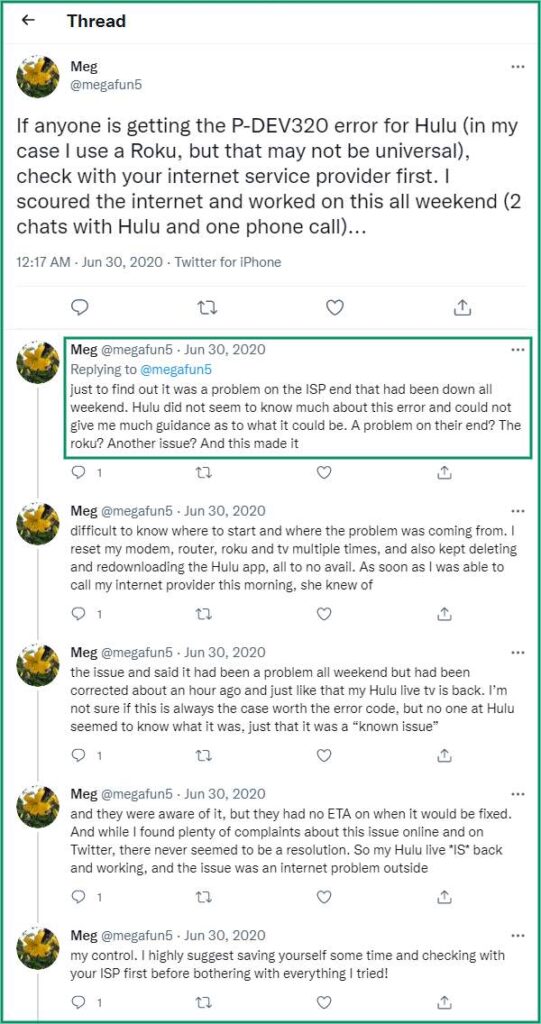
If you are also searching for an answer to how to fix the Hulu error code p-dev320, then follow the solution given by Meg in the tweet. Trust me; it is the best and most straightforward solution. You just need to connect with your ISP service provider and get your connection checked. Once your network is set, you can get back to watching your favorite videos back. Indeed, Meg has offered an excellent solution for us all, right!
The steps that I would suggest are the following:
- Close all the programs
- Disconnect all the devices
- Check the router settings
- Reset and reconnect to check the performance.
Solution 2: Clear Cache
Some users like fredreed2000, who have encountered the Hulu p-dev320 Roku linked issue have suggested that clearing the cache is a beneficial solution. As per my suggestion, this solution has multiple benefits. It will not only restore the Hulu performance but will also remove unwanted files from the system. Now you need to follow different steps for different devices.
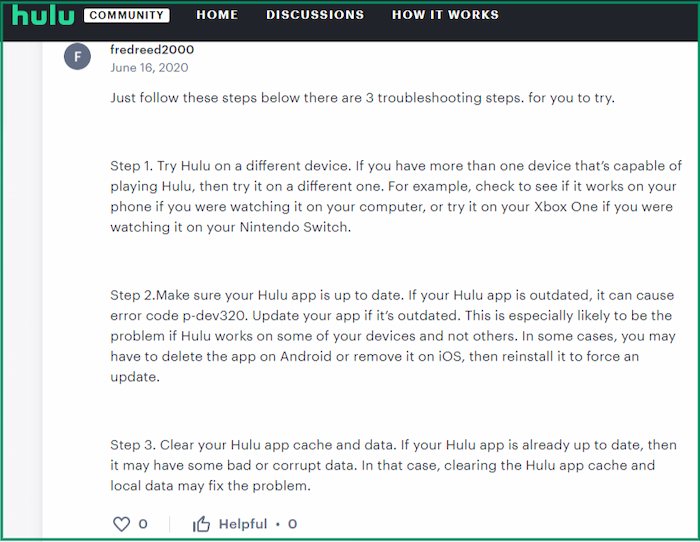
- While facing the Hulu error code p-dev320 on IOS, then do the following: Go to Settings > Select General > Go to storage > Select Hulu > Uninstall Hulu > Reinstall the app
- If you are using Hulu on TV, and facing p-dev320, then follow the steps below: Click on Settings > Move to Applications > Select Managed Installed Applications > Go to Hulu > Select Clear Cache and Clear Data
- When we use the Android device and encounter the p-dev320 error code, then do the following: Select Settings > Click on Apps > Select See All Apps > Click on Storage And Cache > Select Clear Storage > Select Clear Cache
Solution 3: Try Other Device
It is something that usually works for most of us. Simply try using Hulu on some other device and see if the problem remains. If not, then the problem is with the device you were using for Hulu. And if the p-dev320 Hulu error is still there, it is linked to the Hulu server end.
Solution 4: Update or Reinstall the App
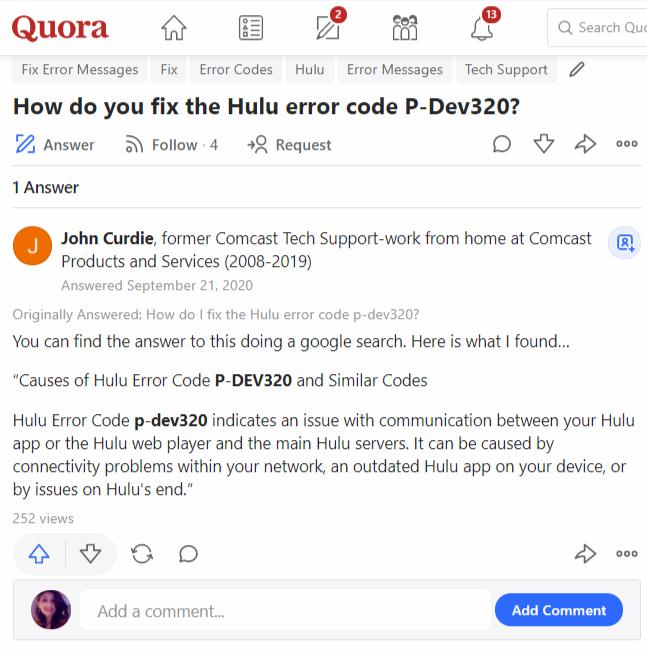
A simple solution suggested by a user over the Quora on the Hulu community can help you get your Hulu working. While encountering Hulu error code p-dev320, just check whether you have got any update requests pending for the application. If it is there, update to the latest version.
Solution 5: Hulu Expert Assistance
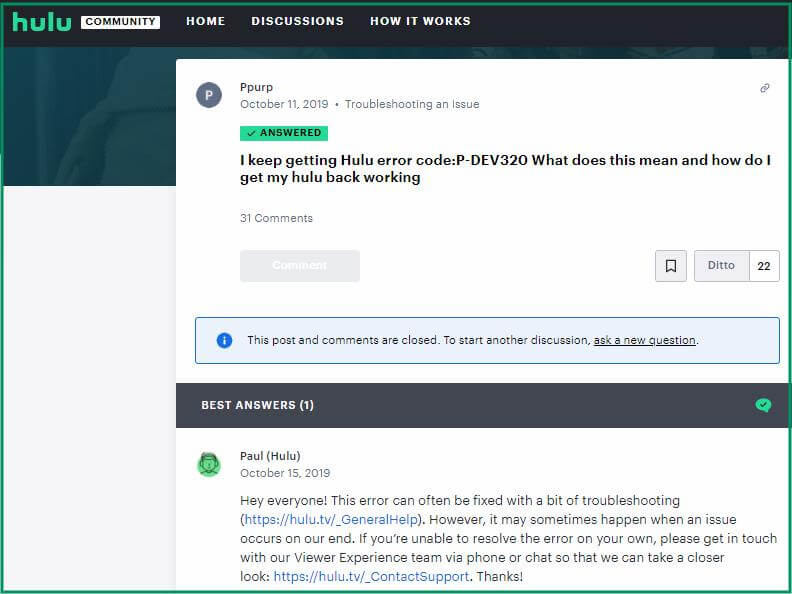
If you are still stuck with the Hulu p-dev320, try connecting with the Hulu Support. A solution shared by Paul over the Hulu community. Simply check the source help.hulu.com/video-02 error code p-dev320 for the solution. Most of the time, this is the best solution that works for most of us.
Conclusion
I hope these solutions help you while you face the Hulu error code p-dev320. So, next time if you are trying to get the solution to how to fix Hulu error code p-dev320, try one of these, and I am sure your Hulu will usually work back, allowing you to enjoy the videos you wish to!
Part: How to Fix Hulu Error Code P-DEV318
Watching video-on-demand content on online platforms is one of the great experiences to have. It allows us to select the content of our choice at a comfortable time. Allowing the viewers like us to set everything perfectly and enjoy the content that we are actually looking forward to, Hulu has gained quite a good amount of viewers soon.
One of the finest platforms with the most user-friendly prices and comfortable access, Hulu is amazing in all aspects. But still, there are few errors that you might face while using it. The Hulu error code p-dev318 is one such error that can create a hassle.
So, let us look at the details of the Hulu error p-dev318.
About Hulu Error Code P-dev318
Few issues are sometimes encountered by users like us while using the Hulu application. Knowing the Hulu error code p-dev318 meaning can be a great shot at understanding the causes and various solutions linked to it.
It is basically a playback issue that is quite common and is encountered by various users. A common issue, users, look for the potential solutions of the same by discussing over various platforms that allow us to connect and understand.
But before we search for the solution, it is actually important to know the exact problem. So, let us look at the causes and solutions of the p-dev318.
Causes Of Hulu Error Code P-dev318
In my experience, the major causes of the Hulu error code p-dev318 are:
- Hulu server issues due to maintenance
- Low bandwidth causing connectivity problems
- Slow internet connection causing interruptions
Now once we have identified the reasons for the error, finding the solution becomes even more accessible. So, let us find the solutions.
Resolving Hulu Error Code P-dev318
I am sure you must be looking for a solution top-dev318 Hulu. The solutions are quite simple and straightforward, allowing users to rectify the issue and get Hulu back to functionality. So, here are the top solutions that are tried and tested by various users and shared over communities to help you out.
Solution 1: Check Internet Connection
Hulu needs a stable and high-speed internet connection to operate. While the minimum requirement is 3.0 MBPS, a lower speed can cause hassle and disrupt the connection. As suggested by various users, rebooting the internet can help a great deal. Simply disconnect your modem or router and reconnect it after a couple of seconds. It can help you resolve the issue. The best part is that this resolution is shared by StreetCinema919 and is attained on its own.
But if you still face the Hulu not working on Xbox one after following the steps, try to run on speed test. If the speed is still slow, then try the below:
- Turn off the streaming device
- Disconnect all the devices
- Close all the programs
- Connect a device directly to ethernet cable
- Shift modem and router close to the device
Solution 2: Check Hulu On Other Device
Sometimes, there are chances that the Hulu application might not be working on one device. The Hulu error code p-dev318 on tv might sometimes be due to device issues, so using Hulu on Roku or Xbox can solve the issue directly.
Reading Recommendations:
- How To Fix Hulu Error Code P-DEV320
- How To Fix Hulu Error Code 94 Easily
- How To Fix Hulu Error Code RUNUNK13
- How To Fix Hulu Error Code P-TS207
Solution 3: Clear Hulu App Cache Data
A perfect solution for almost all the issues on Hulu is to clear the cache memory. Whether you are experiencing the Hulu error code p-dev318 apple tv or any other device, this will help greatly. Offered by various users, the steps to be followed for different devices are:
Follow the below steps to clean the cache on Hulu while getting error code p-dev318 on iPhone/iPad, Apple TV, Firestick TV, Samsung tv, and Android devices:
- For iPad or iPhone:
Go to Settings > Select General > Go to storage > Select Hulu > Uninstall Hulu > Reinstall the app
- For Apple TV:
Click on Menu and Home button > Move to Settings > Select System > Go to Restart
- For Android Devices:
Select Settings > Click on Apps > Select See All Apps > Click on Storage And Cache > Select Clear Storage > Select Clear Cache
- For Firestick TV:
Click Settings > Move to Applications > Select Managed Installed Applications > Go to Hulu > Select Clear Cache and Clear Data.
Solution 4: Update Application
Simple and straightforward, it is one of the most popular options confirmed by various users. Simply look for any pending updates and finish them. Restart the system and reconnect after the update is finished. You will fix the p-dev318 Hulu error.
Solution 5: Use Different Browser
It is, in my opinion, a fairly straightforward answer. If you’re having trouble watching Hulu on Chrome and getting the Hulu error code p-dev318, consider switching to Firefox or another browser. Also, Hulu not working on Xbox One is a typical occurrence, so you should consider other solutions.
Solution 6: Restart Device
It is a personal recommendation for you. Even after trying everything, if Hulu isn’t working, the best thing is to restart the system and reconnect. The Hulu error p-dev318 is most likely no longer present. Restarting the device can settle any connection issue or any application problem that might be bugging in.
Solution 7: Hulu Expert Assistance
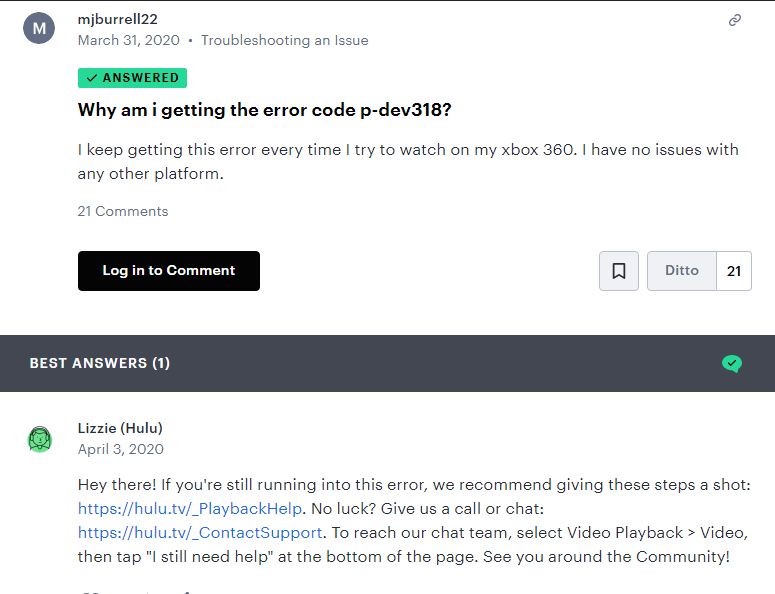
Is the Hulu error code p-dev318 still bothering you? If this is the case, the best course of action is to contact the Huu support team. Hulu will notify you if there is a problem with their servers. If not, the support team will endeavor to rectify the problem and provide you with assistance. As a user, we can post the issue on any community like Twitter, Hulu Community, Reddit, or Quora, and Hulu support will connect to extend support.
- Playback Help Support: https://hulu.tv/_PlaybackHelp
- Direct Contact Hulu Support: https://hulu.tv/_ContactSupport
Conclusion
I hope you now have a better understanding of the p-dev318 Hulu error code. It’s also necessary to understand the Hulu error code p-dev318 meaning to find the best solution. So, if you’re still having trouble with p-dev318 Hulu, try one of the options listed above to get back to watching your favorite shows. To avoid situations like this, make sure your application and software are up to date.
Part: How to Fix Hulu Error Code P-TS207
Hulu is a cutting-edge American subscription service that provides on-demand video at a low cost. It is one of the best and most user-friendly services available, owned by the entertainment powerhouse The Walt Disney Company and NBCUniversal.
Though most of us have used Hulu, one common issue might have bugged you as well. p-ts207 Hulu error code is one such error that occurs most frequently and causes disruption.
Most of you must be wondering what does Hulu error code p-ts207 mean? Indeed, it is essential to first know about the error and then look for potential solutions. So, today With this article, let me share with you the information about Hulu error code p-ts207 and how you can solve p-ts207 Hulu.
About Hulu Error Code p-ts207
When the user encounters problems with the playback, the Hulu error code pts207 appears. When a device connected for networking, such as an Amazon Fire Stick or Roku, encounters a streaming difficulty, the playback error Hulu appears.
Roku users are the ones who most frequently report the Hulu problem p-ts207. But it surely does not mean that we will not encounter the problem when using some other device. If you’re getting a p-ts207 Hulu problem, it’s critical to figure out why and how to fix it.
Reason For Hulu Error Code p-ts207
When any user like us encounters a p-ts207 Hulu error code problem, the biggest question that arises in front of him is finding the reason. You must first know the reason; then only you can find the solution.
So, if you are one of the users facing the Hulu error p-ts207, the main reasons behind this according to my experience can be any one of the following:
- When the server fails to establish a stable and reliable connection with the streaming device.
- Caused by Hulu’s internal difficulties
- Issues such as Hulu’s poor syncing, uneven playback, and excessive buffering
- Hulu device ID error
- Version or network issue
Resolving Hulu Error Code pts207
When you encounter the p-ts207 Hulu error code on your system, we can adopt a few simple methods to resolve the same. These methods need just a couple of steps to be followed and will allow us to resolve the Hulu error code p-ts207. So let us look at the common solutions available.
Solution 1: Check Internet Connection
It should be the first that we should do in case of Hulu error code p-ts207. While we use internet service, there are chances that our provider might be facing some issue that is causing the problem. Just follow some basic things that we should do include:
- Check the status of your internet connection, including its speed.
- If the problem persists, consider moving the modem to a higher location or closer to the device.
- If you have numerous applications open in the background, close them all and recheck Hulu.
- If nothing else works, try running your device by connecting it directly to the ethernet through a cable for smooth connectivity.
Solution 2: Restart Hulu App
Hulu error p-ts207 can also occur when the application is not correctly synced with the system. As shared by Khary over Quora, this solution is widely appropriate. It simply needs to restart the application and connect again with the device. Start with closing the Hulu application and then restart the system to check the performance. Restarting the Hulu app can solve the issue that might be bugging in.
Solution 3: Conduct Power Cycle
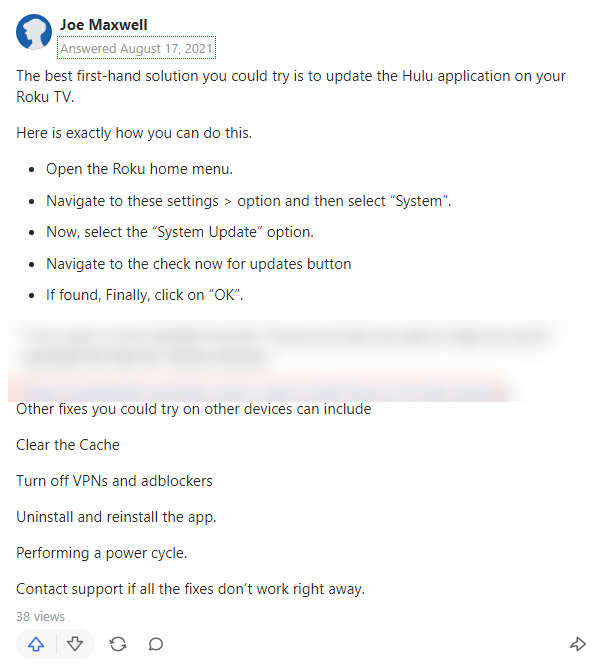
Another great solution that we can try while facing the Hulu error p-ts207 is conducting a power cycle. As shared by Joe Maxwell over Quora, the steps are quite simple to be followed:
- Turn off your internet, connect and disconnect the devices like modem or router
- Unplug the cables and wait for a couple of minutes
- Reconnect the cables and book the connection
- Check the modem or router speed and performance
- Launch Hulu and check the performance.
Reading Recommendations:
- How To Fix Hulu Error Code P-DEV320
- How To Fix Hulu Error Code 94 Easily
- How To Fix Hulu Error Code RUNUNK13
Solution 4: Disable or Change VPN
Well, this is a solution that most of you might find different from the rest. As suggested, it has worked smoothly for many users, but we should still be cautious while using the VPN. So, if you are facing the p-ts207 Hulu error code, then here are mine steps to use the VPN:
- Go to the start menu
- Open Settings
- Find the Network and Internet option
- Open it
- Click on VPN
- Choose VPN as per your location
- Set the details and save
Now use Hulu and check if you are still facing the issue.
Solution 5: Deactivate Current Device
We can use the Hulu account on various devices. There’s a potential that the device id problem on Hulu will show if there are too many devices connected. To fix Hulu error p-ts207, these are few steps that are effective and can be followed:
- Log into your Hulu account using your official ID
- Limit the number of devices you have linked.
It will improve the quality of video streaming.
Solution 6: Update The App
A solution that multiple users on community platforms verify can help resolve the p-ts207 Hulu effectively. Just check if there are any updates of the application that might be pending and complete them. It will help you to resolve the issue.
Solution 7: Clean The Cache
A great solution suggested by Khary Williams, one of the users on Quora, is one with multiple benefits. Clearing cache will improve the overall performance of the system, which is perfect. So, here are how different devices perform cache cleaning.
Follow the below steps to clean the cache on Hulu while getting error code p-ts207 on Roku, firestick, Samsung tv, Vizio tv, iPhone/iPads, and Android devices:
- For Roku:
Press Home button on remote 5 times > Press the Up button > Press fast forward 2 times > wait for a minute > Cache is cleaned
- For Firestick:
Head to Settings > Open Applications > Manage Installed Applications > Open Hulu > Clear cache > Clear data.
- For Vizio tv:
Click on Settings > Select Apps > Select Hulu > select Clear Cache and Clear Data
- For iOS (iPhone/iPads):
Select Settings > Click on General> Click on Storage And Cache > Select Hulu > Select delete and uninstall > Reinstall application
- For android devices:
Click Settings > Move to Applications > Select All Applications >Select Storage And Cache > Go to Hulu > Select Clear Cache and Clear Data.
Solution 8: Connect With Support
Last but not least, this is a great suggestion shared in a tweet of Michael Pagan for all of us. Like various users, my favorite option allows us to connect with the community pages or support by using the help.hulu.com/video-03 p-ts207. Just check the page or post the question and follow the suggestion shared by the team.
Conclusion
Have you encountered the Hulu error code p-ts207? If the problem persists despite the most typical cause being a slow internet connection, try one of the options below. Within minutes, you’ll be able to reconnect to Hulu and begin viewing the videos. I hope you enjoy watching on-demand videos on the platform.
Part: How to Fix Hulu Error Code RUNUNK13
OTT platforms are rising at an incredible pace, and there is no denying that we always look for options that offer better streaming at the most affordable price. One such option is Hulu, which gives you a wide range of video-on-demand services at the most friendly rates.
Though Hulu is the best to use, there are few issues associated with using it. The most common error is the Hulu error code rununk13. Many users have complained about facing the problem over the community platforms, but knowing the solutions is more critical.
So, let us look at what does Hulu error code rununk13 means and the potential solutions to resolve Hulu rununk13.
Hulu Error Code Rununk13
Most of us have used Hulu and even have faced the code Rununk13. But still, the question of what is Hulu error code rununk13? Well, it is one of the most common errors that usually arise due to internet connectivity issues.
It can be better interpreted as the entertainment bug that interferes in connecting the app with the device. It also points towards the fact that you must refresh the information stored in the device for better performance.
So, Hulu rununk13 will basically mean an error encountered with the device. But before we look at the solutions, let us look at the primary causes.
Causes Of Hulu Error Code Rununk13
In my experience, the major causes of the Hulu error code rununk13 are:
- Hulu server outage
- Streaming devices issue such as outdated system software
- Outdated Hulu application
- Slow or unstable internet connection
- Corrupted Hulu caches
- Web Browser or application issue
Now once we have identified the reasons for the error, finding the solution becomes even more accessible. So, let us find the solutions.
Resolving Hulu Error Code Rununk13
I am sure you must be looking for a solution to correct the error. Whether you are facing the Hulu error code rununk13 on a MacBook or Hulu error code rununk13 on the laptop, we have the solution for you. So let us look at the various options below:
Solution 1: Check Internet Connection
Well, this is the first thing to do as per my point of view. Since internet connection is one of the potential issues, start with checking the internet connection. Usually, 3.0MBPS speed is required for streaming, so if you are getting a speed slower than this, the rununk13 Hulu error code mac might appear. So, restart the internet connection and try using Hulu again.
Solution 2: Check Hulu On Other Device
Even after restarting and reconnecting the internet, the Hulu error code rununk13 is still there; try using another device. It might be you are facing the Hulu error code rununk13 on a laptop, but the same will work on Mac. So, try changing the device.
Reading Recommendations:
- How To Fix Hulu Error Code 94 Easily
- How To Fix Hulu Error Code P-DEV320
- How To Fix Hulu Error Code P-TS207
- How To Fix Hulu Error Code P-DEV318
Solution 3: Clear Hulu App Cache Data
Another solution referred to by various users is to clear the Hulu cache data. Corrupt data usually causes various problems, so cleaning the cache regularly is important. Before taking any step, you must know the process to follow for different devices. So, let me share some options here suggested by Destin on the forum:
- While facing the Hulu error code rununk13 on macbook, then do the following:
Go to Settings > Select General > Go to storage > Select Hulu > Uninstall Hulu > Reinstall the app
- If you are using Apple TV, and facing Hulu rununk13, follow the steps below:
Click on Menu and Home button > Move to Settings > Select System > Go to Restart
- When facing the Hulu error code rununk13 on laptop, then do the following:
Select Start > Click on Settings > Select Apps > Click on Apps And features > Select Hulu > Select Advanced Options > Click Reset > Select Delete Cache
- If you are using an Android device and facing Hulu rununk13, follow the steps below:
Select Settings > Click on Apps > Select See All Apps > Click on Storage And Cache > Select Clear Storage > Select Clear Cache
- If you are using Fire TV, and facing rununk13, follow the below:
Click Settings > Move to Applications > Select Managed Installed Applications > Go to Hulu > Select Clear Cache and Clear Data.
Solution 4: Update Application
One of the best solutions offered by various users is simple and easy. Just look for any update pending and complete the same. Once completed with the update, restart the system and connect again. The Hulu API.deejay error 13 will be resolved.
Solution 5: Use Different Browser
Well, in my view this is a very simple solution. If you were using Chrome for playing Hulu and facing the Hulu rununk13, try using Firefox or any other browser. Also, Hulu rununk13 Reddit is quite common, so prefer to use other browser options. The solution is shared by Destin on a community platform.
Solution 6: Use Incognito Mode
The Hulu problem rununk13 is usually caused by a browser that does not provide adequate support. Because incognito mode is the solution, open the program in the Browser’s Private Windows and see if the problem has been resolved. It is one of the solutions that are valid for most users.
Solution 7: Restart Device
It is my personal suggestion for you. Sometimes when Hulu is not working, even after trying out everything, the best thing is to restart the system and connect again. Most probably, the Hulu error code rununk13 will not be there now.
Solution 8: Hulu Expert Assistance
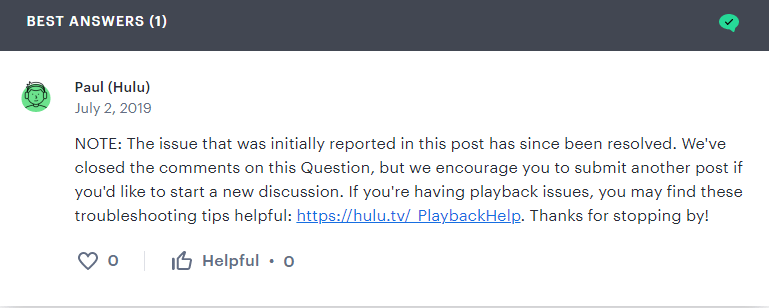
Are you still facing the Hulu error code rununk13? If yes, then the best thing to do is to connect with the Huu support team. If there is any issue at the server end of Hulu, they will inform you about the same. And if not, then the support team will work to resolve the issue and support you. As soon as you post the issue, Paul will be ready to help you.
Conclusion
With this, I hope you are now aware of the Hulu error code rununk13. Also, knowing what does Hulu error code rununk13 means is a must to get the most appropriate solution. So, if you still face Hulu rununk13, try one of the solutions above and start enjoying the entertainment content seamlessly. Remember to keep your application and software updated to avoid such problems from occurring.
Part: How to Fix Hulu Error Code 94
Hulu is a pioneer in the field of new-age American subscription services that offer on-demand video streaming with over tens of thousands of TV series. Hulu is one to stream great enjoyment from binge-watching your favorite TV episodes without any fuss and at the most inexpensive price on any of the devices such as Xbox One, Windows 10 PC, Apple TV, or Android phone.
Using Hulu must be one of the best experiences that you can have. But unlike any other application, Hulu is also one with errors. The Hulu network error or the Hulu error 94 are quite common ones we can face while using the platform.
Many users have complained that Hulu keeps saying check internet connection, but what if the internet is working fine? Well, in such a case, you need to know about the other solutions. Let us see what is error 94 on Hulu?
About Hulu Error 94
Hulu error94 is one of the most regularly encountered Hulu issues. It indicates a problem with the user’s internet connection, which is used to watch Hulu videos. Another cause of error 94 Hulu is that the device and the Hulu applications may not be compatible. There is a potential that the Hulu app is not compatible with PS4 or a Firestick, causing the issue.
So, why won’t hulu load on my computer? It might be a question bugging you. So let us look at the closest reasons.
Reasons for Hulu Error 94
There are several causes for error 94 Hulu. Most of them are related to network and compatibility concerns. The following are the primary causes of the problem according to my experience are listed down below:
- One of the most common causes of Hulu connection error is a bad or unreliable internet connection.
- If the device used to watch Hulu has a faulty cache, there’s a good chance you’ll see Hulu error94.
- The error 94 Hulu appears on the screen when the device’s software is not updated.
- An issue can occur if the server and ISP, or even Hulu and programme, are incompatible.
- The Hulu error 94 can occur if there is an incomplete update or issues on the Hulu server.
- The Hulu error 94 Xbox one is quite common due to compatibility.
Troubleshoot Hulu Error 94
So, if you are facing the Hulu error 94, here are the tried and tested solutions offered by various users over communities. These methods are assured to allow you to have the best resolution of the problem in no time. Shared by various users and a few of them are personally tested, making these solutions a great option for all of us.
Solution 1: Check Internet Connection
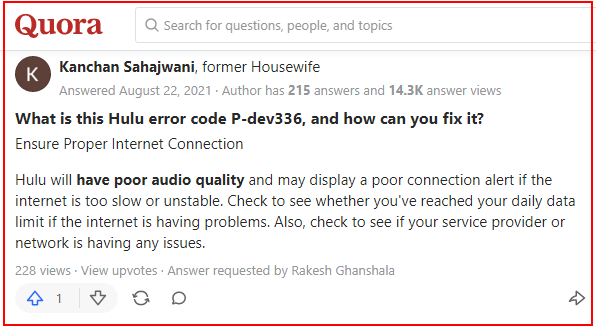
A faulty or inconsistent internet connection almost always causes any type of issue on Hulu. If you’re having trouble streaming, the first thing you should do is double-check your internet connection. Hulu error94 can be resolved by moving the modem to a different place or restarting it. If the problem remains, ethernet may provide a faster solution. It is one of Kanchan Sahajwani tried and tested solutions over Quora and even the first thing suggested by Hulu help.
Solution 2: Reactivating and Deactivating the Device
Reactivating and refreshing is another method to resolve Hulu error 94. Suggested by the majority of the users, this is quite a simple trick that can be adopted and can help you resolve the Hulu error.
The steps that we are required to follow are:
- Go to a web browser
- Navigate to the Hulu site
- Login the application
- Select Account from the list
- Go to manage devices
- Remove the devices
- Log out and log in again
- Reactivate the device; this might help solve your issue
Reading Recommendations: How To Fix Hulu Error Code P-DEV320
Solution 3: Clear Cache
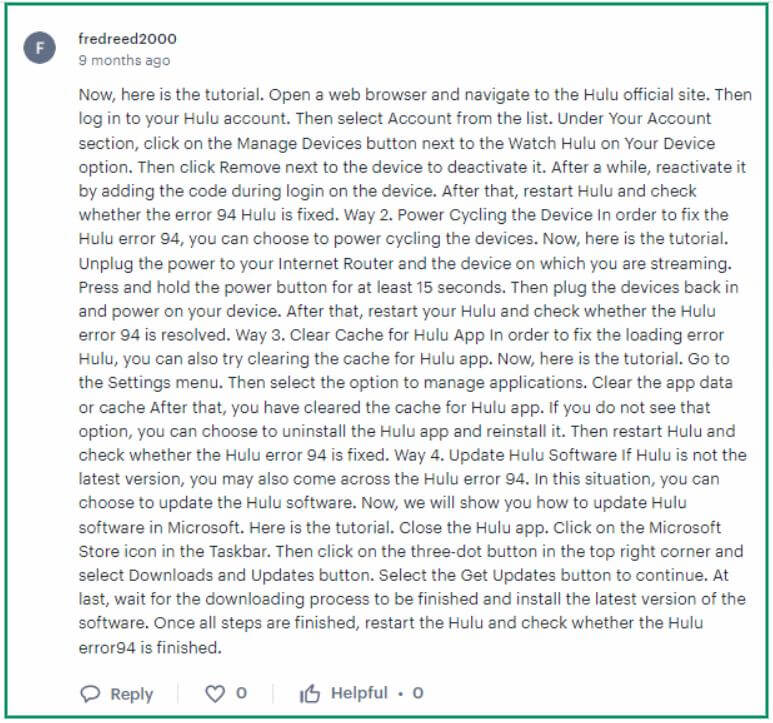
The Hulu error 94 due to corrupt cache is quite common in devices like Smart TVs and Streaming Boxes, PlayStation 4, Xbox One, and others. The steps to be followed to clean the cache are different in different devices. The solution suggested by fredreed2000 over the Hulu community is great… (check the screenshot of what he said)
The broad steps to be followed by us are:
- The steps to clear cache for Hulu error 94 on Roku are:
Press Home button on remote 5 times > Press the Up button > Press fast forward 2 times > wait for a minute > Cache is cleaned
- The steps to clear cache for Hulu error 94 on Firestick are:
Head to Settings > Open Applications > Manage Installed Applications > Open Hulu > Clear cache > Clear data.
- The steps to clear cache for Hulu loading error 94 Samsung smart tv are:
Click on Settings > Select Apps > Select Hulu > select Clear Cache and Clear Data
- The steps to resolve error 94 Hulu Xbox are:
Select Xbox Home Menu > Go to My Games and Apps > Select Apps > Select Hulu > Go to Menu > Select Manage Apps > Clear data
- The steps for Hulu error 94 for android devices:
Click Settings > Move to Applications > Select All Applications >Select Storage And Cache > Go to Hulu > Select Clear Cache and Clear Data.
Solution 4: Update or Reinstall the App
There’s a chance the Hulu app needs to be updated. Sometimes when you face the error 94 Hulu, the reason might be the application is not updated, or you are still using an old application. It is one of the solutions that we can easily apply without any hassle.
The Hulu error 94 can appear if some new plugins are still waiting to be installed. Also, if the difficulty persists after getting the updates, reinstalling the application may be a viable option for resolving the Hulu loading error.
Solution 5: Update and Power Cycle the Device
All of us know that this is a Hulu connection error, so reconnecting devices can help. Now, one must not confuse this as a reactivating or deactivating device. Whether you are using Xbox One, Windows 10 computer, Apple TV, or Android phone, the Hulu error 94 can arise with any.
The steps that we are required to follow are:
- Unplug the internet router
- Power of the system
- Wait for 15-20 seconds
- Reconnect the device back
- Stream again and check
Solution 6: Hulu Expert Assistance
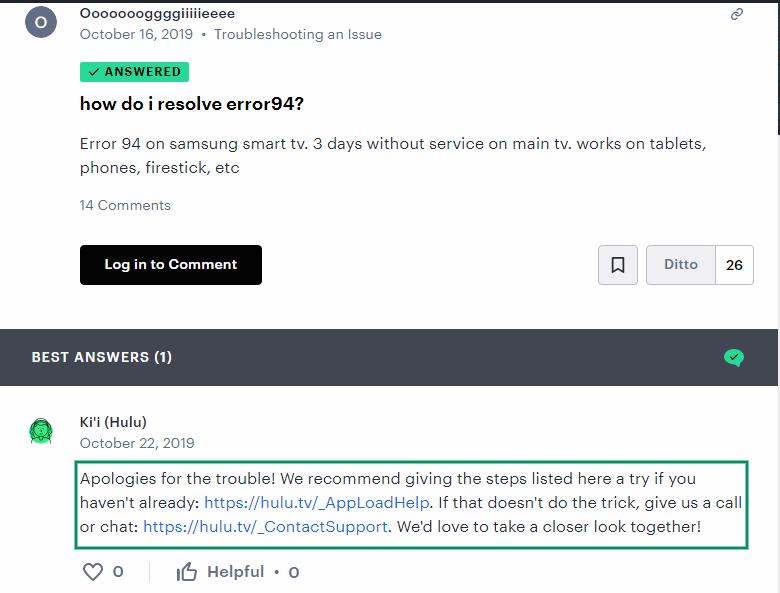
Sometimes, we will still be left with questions like why is Hulu not working on ps4? So, in that case, connecting with Hulu help is the best choice. Like various users, just share your query over the community and follow various suggestions and steps offered, just like one shared by Ki’i (Hulu).
Here are the Hulu support links…
- Issues loading: https://hulu.tv/_AppLoadHelp
- Call or chat: https://hulu.tv/_ContactSupport
Conclusion
While we face the Hulu error 94 or Hulu network error, using any of the methods can help resolve the issue. Clearing the cache and checking the connection stability can offer the finest of the solutions. Ensure to keep your software and applications updated and synchronized for better streaming. Keep your device and application updated to ensure no such issue occurs.
Final Thoughts: Preventing Future Hulu Playback Errors
Most Hulu error codes are temporary hiccups caused by corrupted local app cache, out-of-date device software, or intermittent network drops. By keeping your streaming apps updated, performing regular router power cycles, and ensuring stable DNS resolution, you can avoid 95% of playback interruptions.
PRODUCTIVITY & TASK MANAGEMENT
Organize Your Daily Schedule with StartReMinder
Never lose track of important work, subscriptions, or daily goals. StartReMinder is an all-in-one smart task management application that seamlessly syncs with your Google Calendar and keeps your private data securely organized inside your personal Google Drive account.