
You pick up your iPhone and see the message “iPhone Unavailable” or “iPhone Disabled”. Maybe you forgot the passcode, a child kept guessing it, or you bought a used phone that still has someone else’s Apple ID attached. The device is yours, but the lock screen says otherwise. It is a frustrating situation when your photos, messages, banking apps, and memories are all inside, while Apple gives you limited ways to regain access without the right credentials.
Why Does Your iPhone Get Locked?
There are several common reasons why most iPhones are locked out:
- You forgot the passcode after relying on Face ID for months.
- The iPhone was disabled after too many wrong attempts.
- A second-hand iPhone is still tied to the seller’s Apple ID.
- You lost the Screen Time passcode or iTunes backup password.
- Apple’s official fixes require a known Apple ID, Find My enabled, a trusted computer, or a recent backup.
- The lockout timer can last minutes, hours, or even years on older iOS versions.
On newer iOS versions, repeated failures can disable the device permanently. iCloud erase and Recovery Mode may help, but they are not always practical if you do not know the Apple ID password or the phone has never trusted your computer. In situations like these, many owners start looking for a free iPhone unlocker. FoneTool Unlocker is designed to help with these common lockout problems.
Unlock iPhone Safely and Easily with FoneTool Unlocker
FoneTool Unlocker is a Windows utility for locked and disabled iOS devices. It is designed for common owner-level lockouts and provides several useful unlocking options:
- Removes screen passcodes – Supports 4-digit, 6-digit, custom numeric codes, Face ID, and Touch ID.
- Unlocks disabled iPhones – Works after repeated wrong passcode attempts, including cases where the lockout timer does not clear.
- Removes Apple ID without password – Useful for used devices when the previous owner is unavailable.
- Bypasses Screen Time passcode – Removes restrictions that block settings and apps.
- Removes iTunes backup encryption – Lets you create new backups without the old password.
- Broad compatibility – Supports iPhone 4 through the latest models and iOS 9 and later.
- Simple interface – No technical skills required; the software guides you step by step.
The tool is not a jailbreak and does not install spyware. It removes the lock so you can set up the iPhone again. If you are looking for how to unlock iPhone without password, FoneTool Unlocker provides a clear, guided process.
How to Unlock iPhone Without Passcode Using FoneTool Unlocker
FoneTool Unlocker offers an intuitive interface; the process of removing the lock from an iPhone is simple and reliable. Here is how it works:
Step 1. Download and install.
Download FoneTool Unlocker from the official website and install it on a Windows PC. Connect the locked iPhone to the computer using a certified USB cable. Make sure the cable is undamaged to maintain a stable connection. Then open FoneTool Unlocker and go to Unlock iOS Devicesr.
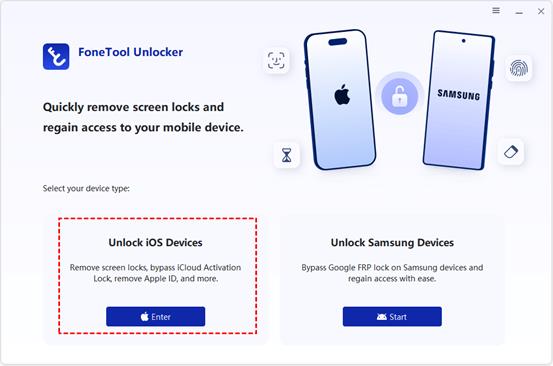
Step 2. Choose the unlock mode.
Open the program, select “Remove iOS Screen Passcode”, and click “Remove Now”. The tool will detect your device automatically.
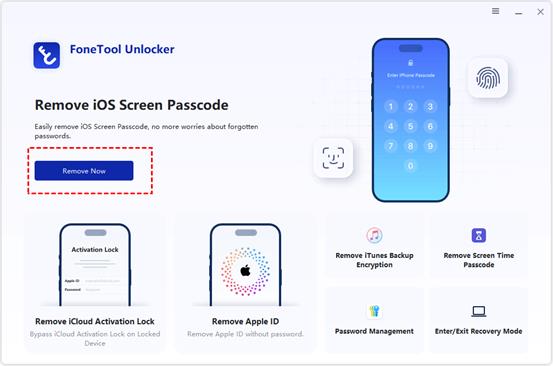
Step 3. Enter Recovery Mode and download firmware.
Follow the on-screen prompts to put your iPhone into Recovery Mode. The required button combination depends on your model. Then download the matching iOS firmware.
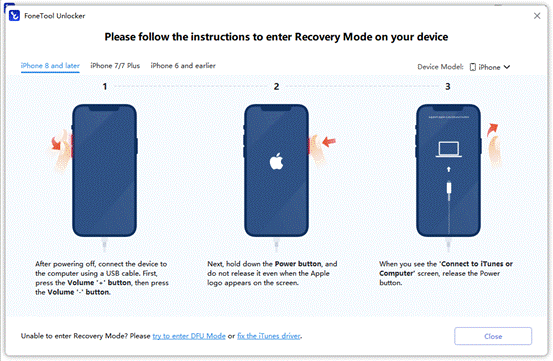
Step 4. Start the unlock and set up.
Click “Remove Now” and wait for the process to finish. The iPhone will restart and display the setup screen. Complete the on-screen setup, and restore your backup if you have one.
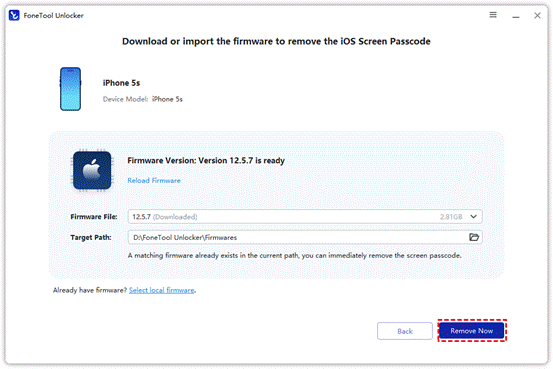
One important note: Removing a passcode erases the device. The same applies to Apple’s official methods. FoneTool Unlocker provides another way to complete the process when the usual options are not available.
Final Thoughts
A forgotten passcode or disabled iPhone is frustrating, but there are still ways to regain access. Apple’s built-in options should be tried first. If they are not available because of an unknown Apple ID, a used device, or a lockout that will not clear, FoneTool Unlocker offers another practical option. It covers screen locks, Apple ID removal, Screen Time, and backup encryption in one tool, giving device owners a straightforward way to handle several common lockout situations.